Difference between revisions of "Controls"
(removed outpost link) |
m |
||
| Line 116: | Line 116: | ||
| style="font-size: large;" | F6 | | style="font-size: large;" | F6 | ||
| Toggles interface (hides GUI including chat and emotes) | | Toggles interface (hides GUI including chat and emotes) | ||
| − | |||
| − | |||
| − | |||
|} | |} | ||
==See also== | ==See also== | ||
Revision as of 01:51, 8 December 2013
Gameplay Basics
Here is a small controls guide that can also be found on the KAG Website.
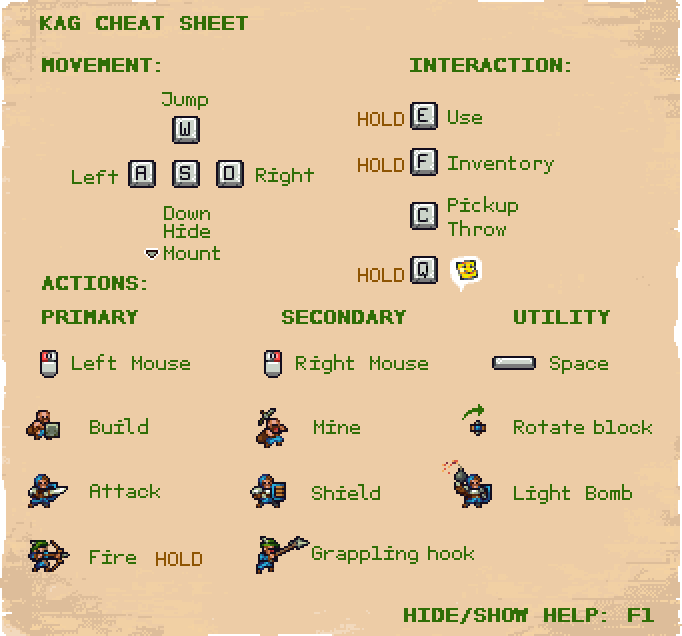
Default Controls
These are the default controls for the game on a Windows computer. Keys in bold can be rebound to different keys in the settings menu.
| Mouse | Function |
|---|---|
| Left mouse button | Action 1
|
| Right mouse button | Action 2
|
| Mouse wheel up/down | Zoom in/out
|
| Mouse cursor | Aim |
| Key | Function |
|---|---|
| A | Move left |
| D | Move right |
| W | Jump |
| S | Crouch/Lay down
Go down a ladder |
| F | Inventory
|
| E | Use
|
| C | Drop and pick up items/objects |
| Q | Emoticons
|
| Space | Knight: Light/Throw bombs |
| M | Minimap (if enabled) |
| Esc | Settings menu
|
| 1/2/3/4/5/6/7/8/9 | Emotes ( / / / / / / / / / / / / / / / / ) )
|
| Enter/T | Public Chat |
| Y | Team Chat |
| Tab | Scoreboard
|
| Home | Command console |
| F1 | Toggle help |
| F4 | Take a screenshot (saved in KAG folder /screenshots) |
| F6 | Toggles interface (hides GUI including chat and emotes) |
