Difference between revisions of "Controls"
(→Default Controls) |
|||
| (30 intermediate revisions by 11 users not shown) | |||
| Line 1: | Line 1: | ||
{{Build | {{Build | ||
| − | |Version = | + | |Version = 915 |
}}<br> | }}<br> | ||
| − | {| class="wikitableShiny" | + | =Gameplay Basics= |
| + | Here is a small controls guide that can also be found on the [http://kag2d.com/en/download KAG Website]. | ||
| + | |||
| + | [[File:Controls2.png|link=http://kag2d.com/en/download]] | ||
| + | |||
| + | =Default Controls= | ||
| + | These are the default controls for the game on a Windows computer. Keys in '''bold''' can be rebound to different keys in the settings menu. | ||
| + | |||
| + | {| width="60%" class="wikitableShiny" | ||
|- | |- | ||
| − | ! scope="col" width=" | + | ! scope="col" width="200" | '''Mouse''' |
! '''Function''' | ! '''Function''' | ||
|- | |- | ||
| − | | style="font-size: large;" | Left mouse button | + | | style="font-size: large;" | '''Left mouse button''' |
| − | | [[Knight]]: | + | | Action 1 |
| + | <br>[[Knight]]: Jab with the [[sword]], hold to charge slash, destroy [[blocks]]/[[door]]s<br> | ||
[[Archer]]: Aim, click and hold, release to shoot | [[Archer]]: Aim, click and hold, release to shoot | ||
| − | <br>[[Builder]]: Build [[blocks]] | + | <br>[[Builder]]: Build [[blocks]] and repair [[blocks]] |
<br>Fire [[catapult]] | <br>Fire [[catapult]] | ||
| + | <br>Fire [[ballista]] | ||
|- | |- | ||
| − | | style="font-size: large;" | Right mouse button | + | | style="font-size: large;" | '''Right mouse button''' |
| − | | [[Knight]]: Defend with the [[shield]] | + | | Action 2 |
| − | [[Archer]]: | + | <br>[[Knight]]: Defend with the [[shield]] and shield bash. |
| − | <br>[[Builder]]: Cut down [[tree]] | + | [[Archer]]: Shoots out a grappling hook, hold to latch onto blocks and [[tree|trees]] |
| + | <br>[[Builder]]: Cut down [[tree|trees]], mine resources, attack with pickaxe, break blocks | ||
|- | |- | ||
| − | | style="font-size: large;" | Mouse wheel up/down | + | | style="font-size: large;" | '''Mouse wheel up/down''' |
| Zoom in/out | | Zoom in/out | ||
| + | <br>Zooming all the way out sets Aim Mode | ||
|- | |- | ||
| style="font-size: large;" | Mouse cursor | | style="font-size: large;" | Mouse cursor | ||
| Line 27: | Line 39: | ||
{| class="wikitableShiny" | {| class="wikitableShiny" | ||
|- | |- | ||
| − | ! scope="col" width=" | + | ! scope="col" width="200" | '''Key''' |
! '''Function''' | ! '''Function''' | ||
|- | |- | ||
| − | | style="font-size: large;" | A | + | | style="font-size: large;" | '''A''' |
| Move left | | Move left | ||
|- | |- | ||
| − | | style="font-size: large;" | D | + | | style="font-size: large;" | '''D''' |
| Move right | | Move right | ||
|- | |- | ||
| − | | style="font-size: large;" | W | + | | style="font-size: large;" | '''W''' |
| Jump | | Jump | ||
| − | Climb a [[ladder]] (Archer can also climb | + | Climb a [[ladder]] (Archer can also climb [[tree]]s) |
|- | |- | ||
| − | | style="font-size: large;" | S | + | | style="font-size: large;" | '''S''' |
| Crouch/Lay down | | Crouch/Lay down | ||
| − | + | Go down a [[ladder]] | |
|- | |- | ||
| − | | style="font-size: large;" | | + | | style="font-size: large;" | '''F''' |
| − | | | + | | Inventory |
| − | + | <br>[[Knight]]: Select type of [[bomb]]<br> | |
| − | <br> | + | [[Archer]]: Select type of [[arrow]]<br> |
| + | [[Builder]]: hold to select [[blocks]] to build | ||
|- | |- | ||
| − | | style="font-size: large;" | | + | | style="font-size: large;" | '''E''' |
| − | | [[ | + | | Use |
| − | + | <br> | |
| + | Change [[classes]] (at [[tent]]/[[workshop]])<br> | ||
| + | Build/buy from [[Workshop|workshops]]<br> | ||
| + | Enter Object Menu | ||
|- | |- | ||
| − | | style="font-size: large;" | C | + | | style="font-size: large;" | '''C''' |
| − | | Drop and | + | | Drop and pick up items/[[objects]] |
|- | |- | ||
| − | | style="font-size: large;" | | + | | style="font-size: large;" | '''Q''' |
| − | | | + | | Emoticon Wheel |
| + | <br>Tap for the first emote ([[File:emote1.png]]) | ||
| + | Hold to open the emoticon selection | ||
|- | |- | ||
| − | | style="font-size: large;" | | + | | style="font-size: large;" | '''Space''' |
| − | | | + | |<br>[[Knight]]: Light/Throw bombs |
|- | |- | ||
| − | | style="font-size: large;" | | + | | style="font-size: large;" | M |
| − | | | + | | Minimap (if enabled) |
|- | |- | ||
| − | | style="font-size: large;" | | + | | style="font-size: large;" | Esc |
| − | | | + | | Settings menu |
| + | <br>Hat/Gender customization | ||
| + | <br>Clantag customization | ||
| + | <br>Quit to menu | ||
| + | <br>Start a vote | ||
<br>Suicide | <br>Suicide | ||
| − | <br> | + | <br>Team selection |
| − | <br> | + | <br>Spectator mode |
|- | |- | ||
| − | | style="font-size: large;" | | + | | style="font-size: large;" | 1/2/3/4/5/6/7/8/9 |
| − | | Emotes | + | | [[Emotes]] ([[File:emote1.png]]/[[File:emote2.png]]/[[File:emote3.png]]/[[File:emote4.png]]/[[File:emote5.png]]/[[File:emote6.png]]/[[File:emote7.png]]/[[File:emote8.png]]/[[File:emote9.png]]) |
|- | |- | ||
| style="font-size: large;" | Enter | | style="font-size: large;" | Enter | ||
| − | | Chat | + | | Open Chat |
|- | |- | ||
| − | | style="font-size: large;" | | + | | style="font-size: large;" | T |
| − | | | + | | Public Chat |
| + | |- | ||
| + | | style="font-size: large;" | Y | ||
| + | | Team Chat | ||
|- | |- | ||
| style="font-size: large;" | Tab | | style="font-size: large;" | Tab | ||
| Scoreboard | | Scoreboard | ||
| + | <br> See players and K/D | ||
|- | |- | ||
| style="font-size: large;" | Home | | style="font-size: large;" | Home | ||
| Line 92: | Line 118: | ||
| Take a screenshot (saved in KAG folder /screenshots) | | Take a screenshot (saved in KAG folder /screenshots) | ||
|- | |- | ||
| − | | style="font-size: large;" | | + | | style="font-size: large;" | F6 |
| − | | | + | | Toggles interface (hides GUI including chat and emotes) |
|} | |} | ||
==See also== | ==See also== | ||
*[[Movement]] | *[[Movement]] | ||
| + | |||
| + | [[Category:Client]] | ||
Latest revision as of 11:58, 22 July 2016
Gameplay Basics
Here is a small controls guide that can also be found on the KAG Website.
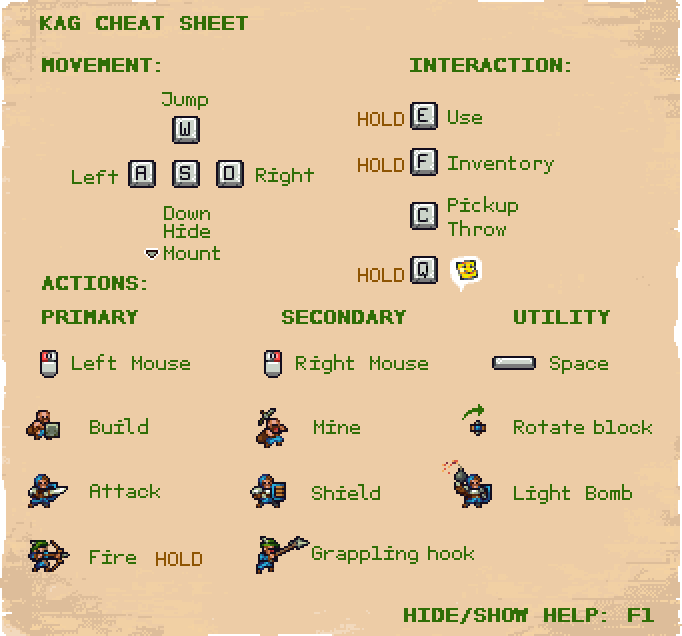
Default Controls
These are the default controls for the game on a Windows computer. Keys in bold can be rebound to different keys in the settings menu.
| Mouse | Function |
|---|---|
| Left mouse button | Action 1
|
| Right mouse button | Action 2
|
| Mouse wheel up/down | Zoom in/out
|
| Mouse cursor | Aim |
| Key | Function |
|---|---|
| A | Move left |
| D | Move right |
| W | Jump |
| S | Crouch/Lay down
Go down a ladder |
| F | Inventory
|
| E | Use
|
| C | Drop and pick up items/objects |
| Q | Emoticon Wheel
|
| Space | Knight: Light/Throw bombs |
| M | Minimap (if enabled) |
| Esc | Settings menu
|
| 1/2/3/4/5/6/7/8/9 | Emotes ( / / / / / / / / / / / / / / / / ) )
|
| Enter | Open Chat |
| T | Public Chat |
| Y | Team Chat |
| Tab | Scoreboard
|
| Home | Command console |
| F1 | Toggle help |
| F4 | Take a screenshot (saved in KAG folder /screenshots) |
| F6 | Toggles interface (hides GUI including chat and emotes) |
